Version 1.2: set your own goals and measure them
As of version 1.2 you set your own goals in Traffalyzer, for example a keyword in the top 3 or more leads. Traffalyzer measures progress, suggests actions and shows what they achieved. Plus: open pages straight from the growth plan and log relaunches in the history.
Traffalyzer 1.2 is live as of today. The biggest change: you set your own goals, and Traffalyzer measures from your real data whether you are getting closer. It also suggests actions that move exactly that goal and later shows what they achieved.
Goals
A goal is a number you want to move: get a keyword or long-tail keyword into the top 3, get more clicks to an important page, lower the bounce rate of your pricing page or trigger more leads. Every domain now has a "Goals" section, right below the growth plan. You can also start from a keyword's detail view: "Set as goal" takes over the keyword and suggests a reachable target position.
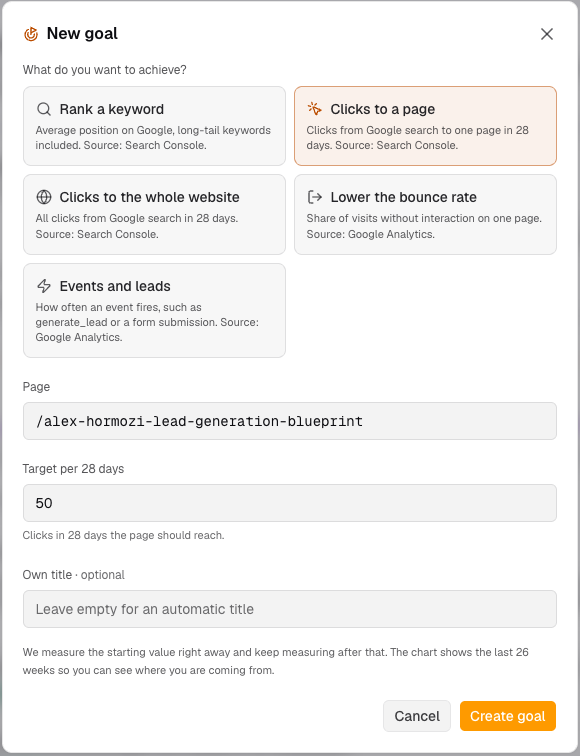 Creating a goal: pick the type, enter the page or keyword, set the target.
When you create a goal, Traffalyzer measures the starting value right away. Each goal card then shows the current value, the target, the start, the progress and the trend of the last four weeks, plus a chart of 26 weeks with the target line. So you also see where you are coming from. Once a goal is reached it is marked as reached; you can set a more ambitious target at any time.
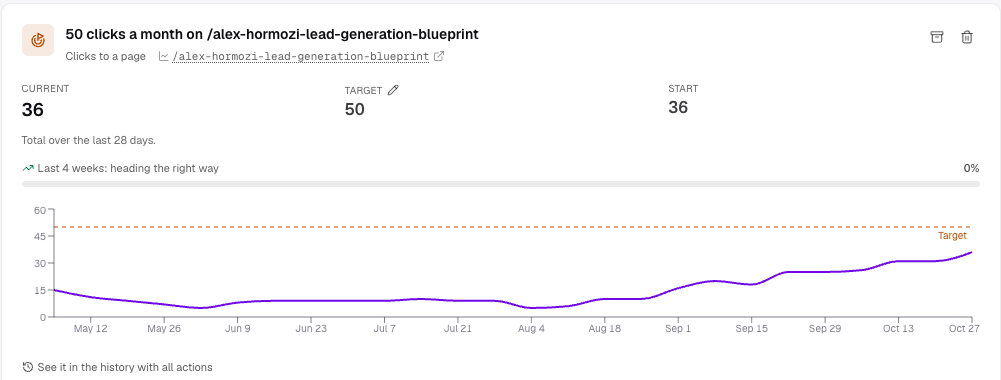 A real goal on nikofischer.com: the page climbed from 6 to 36 clicks a month over recent weeks, the dashed line marks 50.
There is deliberately no deadline. Nobody controls when Google reacts to a change, and a due date would only fake a precision that does not exist. Traffalyzer simply keeps measuring.
What is measured
| Goal | Metric | Source |
|---|---|---|
| Rank a keyword | Average position over the last 7 days | Search Console |
| Clicks to a page | Clicks over the last 28 days | Search Console |
| Clicks to the whole website | Clicks over the last 28 days | Search Console |
| Lower the bounce rate | Bounce rate of one page, 28 days | Google Analytics 4 |
| Events and leads | Count of a GA4 event, e.g. generate_lead, 28 days, optionally per page | Google Analytics 4 |
Values are fetched from Google at most every twelve hours. As always, Search Console runs about three days behind.
Actions for exactly this goal
At the push of a button the AI looks at what matters: which pages rank for the keyword, what their title and description look like, how much text the page has, how many internal links point to it and what the last scan found there. From that it suggests three to five concrete steps, sorted by impact, each with a reason and the steps to take. You can add your own actions too.
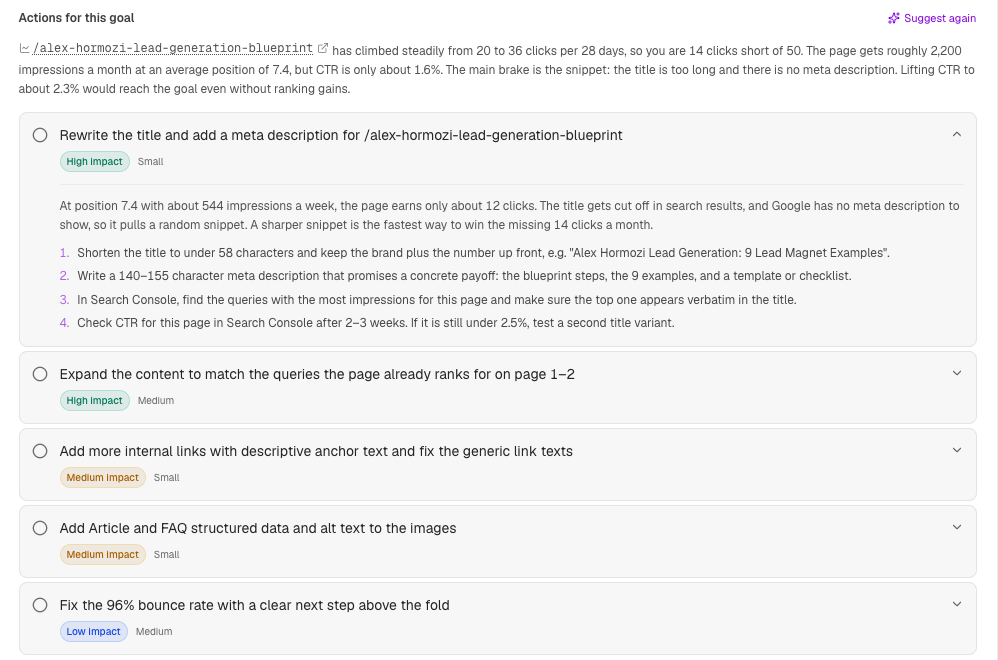 The suggestions for the same goal: the AI works out that a better click-through rate alone would reach 50 clicks, so it starts with the snippet.
Whatever you tick off goes into the history as an action and is measured there like any other: 28 days before against 28 days after, adjusted for the rest of the website. After about five weeks the result shows up right on the goal. So you see not only whether the goal is getting closer but also which action contributed.
Where goals show up elsewhere
Your goals have their own card in the growth plan. In the keyword list, keywords with a goal carry a flag. In the history, "Goal set" and "Goal reached" appear as markers. A newly created growth plan aligns its steps with your active goals, and the AI chat knows them as well.
Open pages straight from the growth plan
Every page the growth plan mentions is now a link: in the assessment, at a step's target and in the instructions. With Search Console connected, one click shows that page's clicks and impressions in the history, including every action on that page. The arrow next to it opens the page in your browser.
Log a relaunch in the history
A new website, a new CMS or a new URL structure can now be recorded as its own "Relaunch" action. It always applies to the whole website and shows up in the chart as a solid line, even when it is not selected. So for every metric you see at a glance what happened before and after the relaunch.
What you get for free, what Pro adds
| Free | Pro | |
|---|---|---|
| Active goals | 1 | up to 25 |
| Action suggestions per goal | yes | yes |
| Open plan pages in the history | no, the link opens the page | yes |
| Self-logged actions incl. relaunch | 3 active | unlimited |
Pro costs €5 per domain and month plus VAT. Goals from search need a connected Search Console, bounce rate and events need Google Analytics 4. Both connections are available on the free plan too.